Rental & DSCR · Excel
BRRRR Refinance Planner
Download a BRRRR refinance planner to reconcile purchase and rehab cash, the bridge payoff, closing costs and capital remaining in the stabilized rental.
When to use this resource
Build the purchase, renovation and refinance as separate stages. Record money already contributed, funds still needed to finish and the full expected bridge payoff. Then compare the supported refinance amount with the costs and debt it must pay.
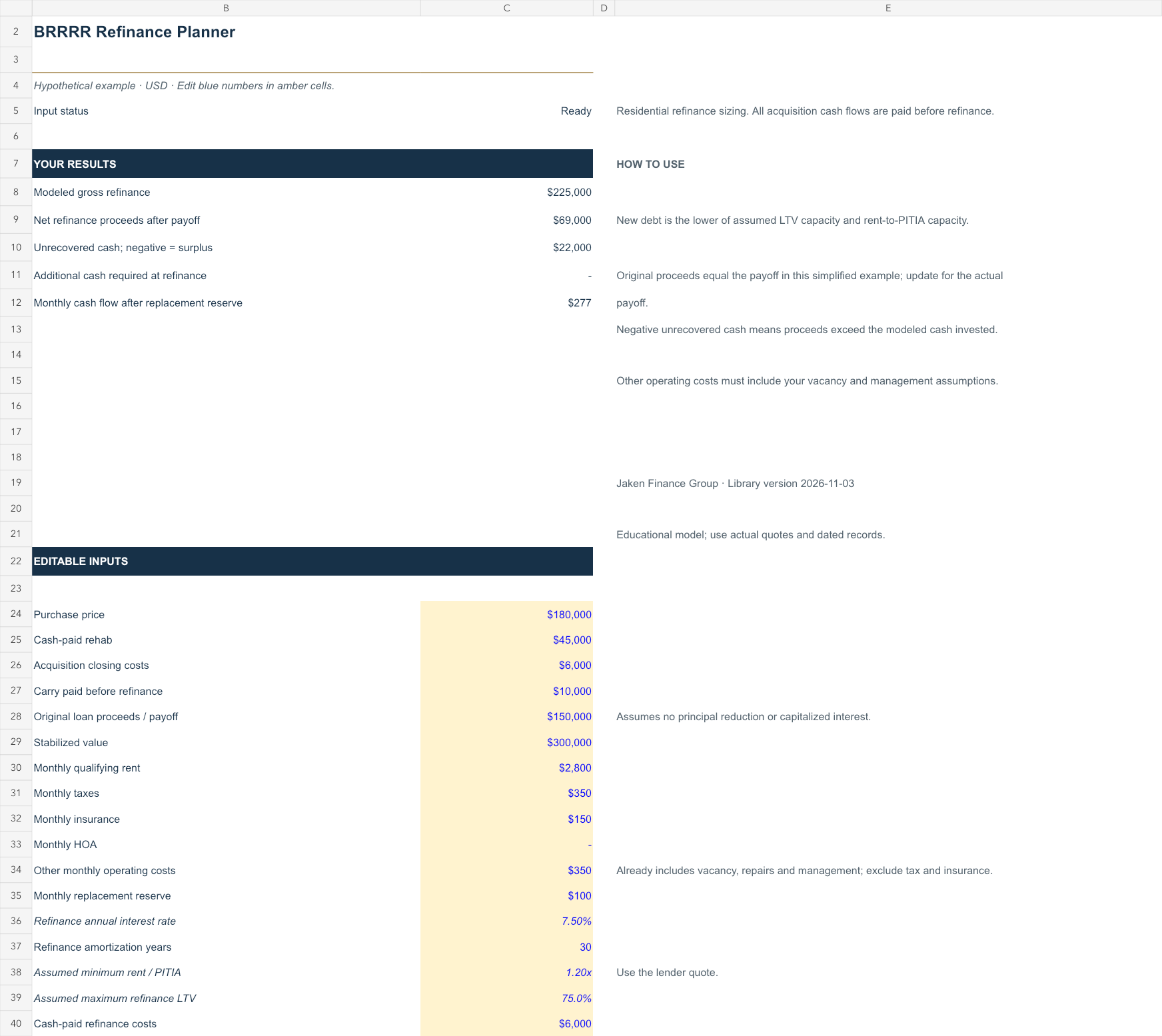
What you enter
- Purchase, rehab, carry and original loan
- Stabilized value, rent and expenses
- Refinance terms, costs and coverage target
What you get
- Refinance capacity and net proceeds
- Cash recovered or additional cash required
- Cash remaining and rental cash flow
How to use it
- Submit your email to unlock the workbook or tool. Any PDFs below download directly without an email.
- Save a working copy, review the instructions and replace the example with your records.
- Check the results against your lender’s terms and retain a dated copy for the property.
Excel workbooks contain editable inputs and formulas. Example assumptions are illustrative; they are not current market quotes or financing commitments.
What to check before relying on the result
Cash left in the property can remain substantial even after a successful refinance. Check ownership seasoning, accepted value and rent evidence with the replacement lender. A projected appraisal increase alone does not establish available cash-out.