Financing · Excel
Loan Quote Comparison Workbook
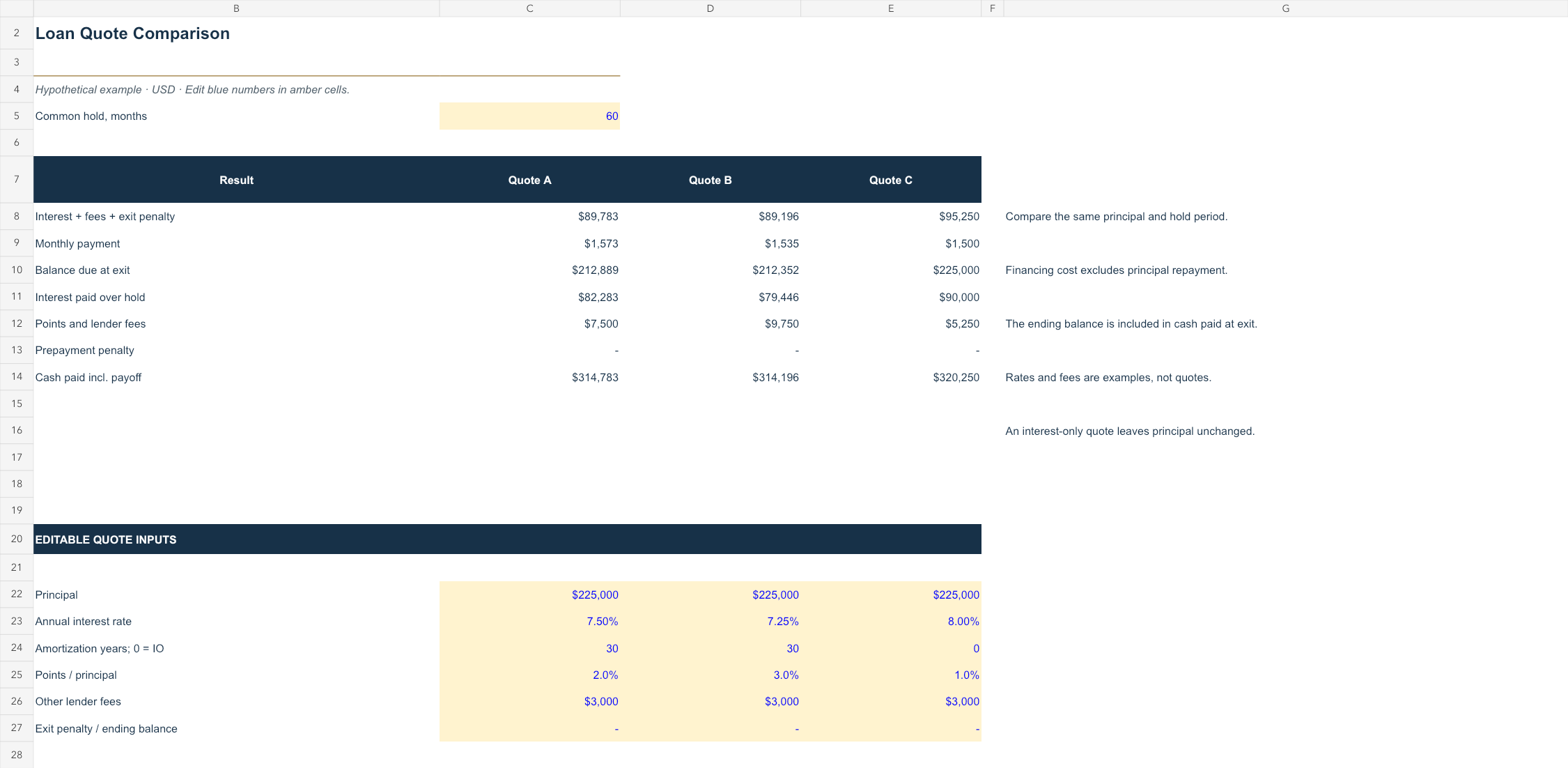
Download a loan quote comparison workbook. Compare interest, fees, prepayment charges and exit balances across three proposals using one planned hold period.
When to use this resource
Enter each written proposal using the same loan amount and expected repayment date where possible. Record fees, interest method, amortization and any prepayment or extension charges. Note important differences in advance amounts and restricted funds.
What you enter
- Principal, rates and amortization
- Points, lender fees and exit penalties
- Common holding period
What you get
- Payment and balance at exit
- Interest plus fees and penalty
- Cash paid and financing cost comparison
How to use it
- Submit your email to unlock the workbook or tool. Any PDFs below download directly without an email.
- Save a working copy, review the instructions and replace the example with your records.
- Check the results against your lender’s terms and retain a dated copy for the property.
Excel workbooks contain editable inputs and formulas. Example assumptions are illustrative; they are not current market quotes or financing commitments.
What to check before relying on the result
The smallest payment does not necessarily create the lowest total cost. Compare cash paid during the hold with the balance due at exit, then check the effect of a later repayment. Confirm how the actual documents calculate every charge.