Rental & DSCR · Excel
Rental Property Deal Analyzer
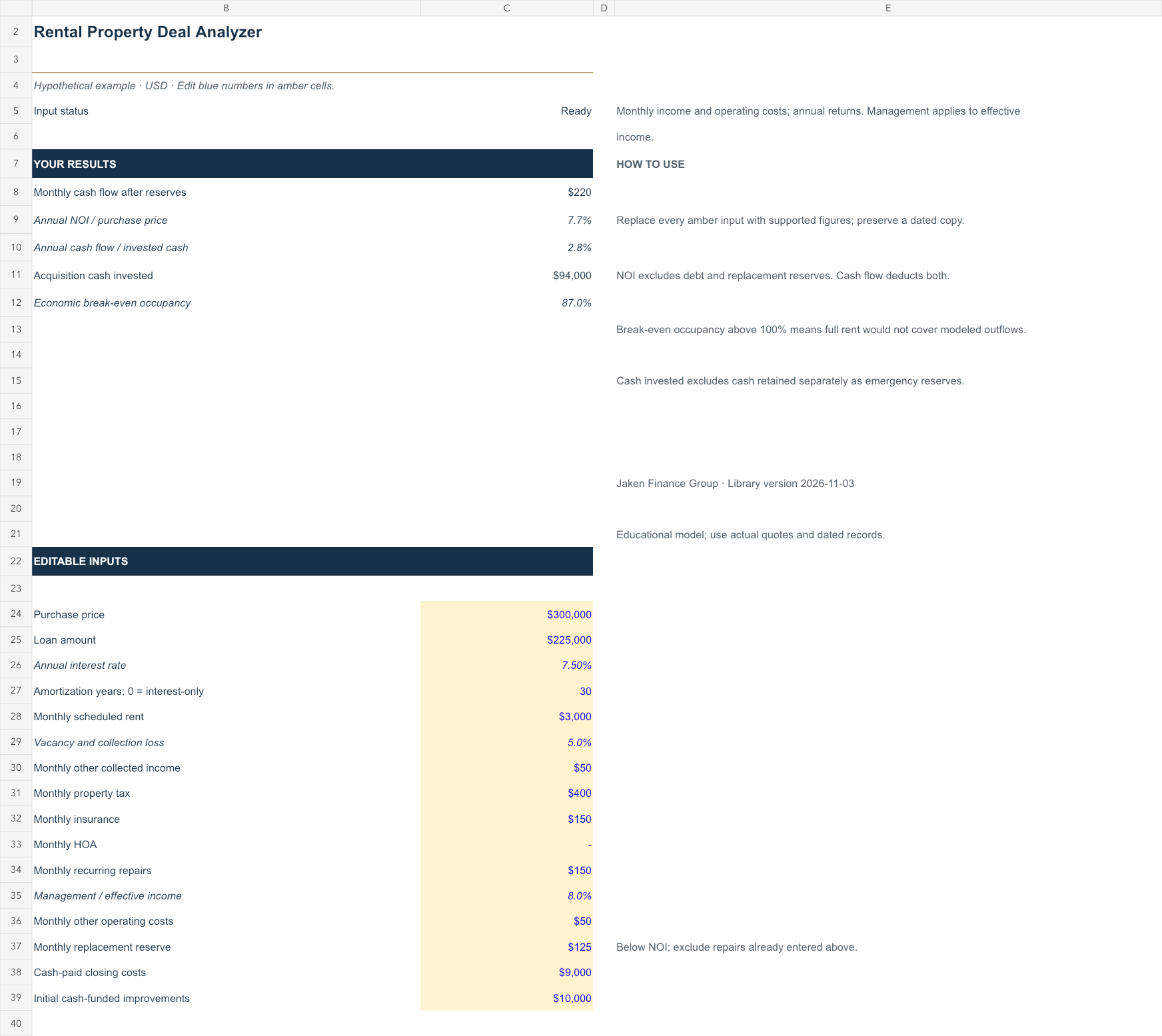
Download a rental property Excel analyzer for cash flow, cap rate, cash-on-cash return and break-even occupancy. Replace example costs with property records.
When to use this resource
Use this model before an offer or when comparing a rental with another use. Enter acquisition costs and the actual financing proposal, then reconcile rent, vacancy and operating costs. The cash-on-cash result depends on the cash you actually invest, including acquisition expenses and reserves included in your plan.
What you enter
- Purchase price, loan and closing funds
- Rent, vacancy and operating expenses
- Replacement reserves and financing terms
What you get
- Monthly cash flow after reserves
- Cap rate and cash-on-cash return
- Break-even occupancy
How to use it
- Submit your email to unlock the workbook or tool. Any PDFs below download directly without an email.
- Save a working copy, review the instructions and replace the example with your records.
- Check the results against your lender’s terms and retain a dated copy for the property.
Excel workbooks contain editable inputs and formulas. Example assumptions are illustrative; they are not current market quotes or financing commitments.
What to check before relying on the result
Review cash flow after reserves alongside the lender’s separate qualification calculation. A positive operating result does not establish loan eligibility, and a higher projected return may depend on an unsupported rent or omitted repair.